World Partition Builder
Errant Landscape provides World Partition Builder that can be used from editor or command-line/builder to update landscape over the whole map forcefully.
It's always possible to run Update Loaded Landscape from the Tools tab in Errant Landscape editor mode to update the map in other cases.
Editor
You can start the process in the editor under the Build menu by selecting the Build Errant Landscape option.
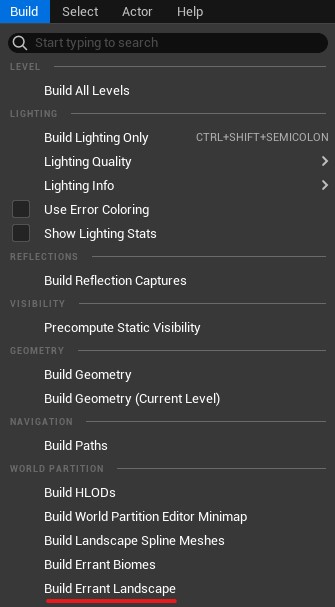
Command Line
Errant Landscape World Partition Builder can be run as a commandlet the same as other world partition builders. Make sure to see the Unreal Engine documentation page first.
The name of the builder is ElWorldPartitionBuilder.
Here's an example following the pattern from Unreal Engine documentation:
UnrealEditor.exe "C:\Users\user.name\Documents\Unreal Projects\MyProject\MyProject.uproject" "/Game/ThirdPersonBP/Maps/OpenWorldTest" -run=WorldPartitionBuilderCommandlet -AllowCommandletRendering -builder=ElWorldPartitionBuilder
Options
-ErrantWaitAndRebuildClassDescRegistry: During a commandlet World Partition module can initialize itself before AssetRegistry is done. While it tries to search for paths synchronously, it fails due to a bug inside asset registry. It happens mostly for blueprint based actors, and blocks them from being loaded by world partition. When this argument is enabled, we wait for asset registry to finish, and recreate ClassDescRegistry.-ErrantBiomesBuildOnlyVolume=[ActorLabel]: Allows you to restrict generation to a single world partition builder volume.-ErrantLogLockedFiles/-ErrantLogLockedFiles=[optional path]: Enables creation of a log which lists which the files that builder failed to save due to them being locked in the source control by someone else. You can provide path to the log file, otherwise it will be stored in the default projects log directory.ErrantLandscapeCellSize: Sets the size of cells we iterate on during generation. In Unreal Units(CM usually). Default value is 102400.
Volumes
It's possible to limit generation area by placing AElWorldPartitionBuilderVolume actors on the level.
There can be more than one such volumes placed on the level, generated area will be a combination of those volumes.
Those volumes also allow you to specify IncludedDataLayers, limiting generation to only data layers added in this list.