Shallow Water
- Errant Paths 1.2 and later
- Errant Paths 1.1 and prior
Unreal Engine's Shallow Water plugin pairs naturally with Errant Paths to create fully procedural rivers. We automate the setup of the shallow water simulation and provide tools to shape every aspect of the river. You can modify the Path using Path Adjustments, including projecting it onto terrain, smoothing it, or adding natural variation by perturbing. The generated river can sculpt the Landscape by carving the river bed, applying falloff and detail noise, and can paint weightmaps. Its width can also vary along the Path using per-point PathSpline scaling — see Widening/Narrowing. Together, these features allow you to generate rivers whose shape, width, terrain deformation, and shallow water simulation are all driven from a single procedural Path.
Setup
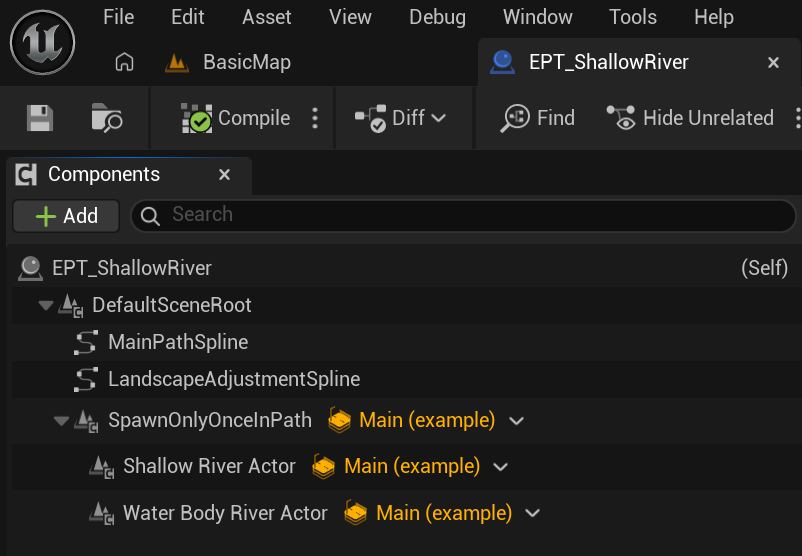
We use a PathDescription with a single PathTemplate that spawns both the Shallow Water River and Water Body River Actors only once along the entire Path. Before performing the Landscape Adjustment, the MainPreSpawnSpline (after all Path Adjustments have been applied) is copied to the Water Body River's spline, ensuring the generated river follows the final Path shape. Once the Landscape Adjustment is complete, the two Actors are linked together and the shallow water simulation is triggered. Both steps are performed using Generation Callbacks: EGC_Setup_Water_Body_River_Spline, EGC_Setup_And_Trigger_Shallow_Water_Simulation, respectively).
Remove Shallow Water dependency
We include Unreal Engine's Water plugins as dependencies to ensure Errant Paths builds correctly out of the box and all water-related features are available. If your project doesn't use the Water plugins, and you prefer to avoid these dependencies, you can remove them by following the instructions below. Errant Paths will continue to build and function correctly, with only the water integration features disabled.
- Delete these assets
- /ErrantPaths/Example/PathDescriptions/EPD_ShallowRiver,
- /ErrantPaths/Example/PathTemplates/EPT_ShallowRiver,
- /ErrantPaths/Example/GenerationCallbacks/EGC_Setup_Water_Body_River_Spline,
- /ErrantPaths/Example/GenerationCallbacks/EGC_Setup_And_Trigger_Shallow_Water_Simulation,
- /ErrantPaths/Example/Water/BP_Shallow_Water_River,
- /ErrantPaths/Example/Water/BP_Water_Body_River.
- Remove this function
UEpBlueprintFunctionLibrary::SetupAndTriggerShallowWaterSimulationfrom code. - Remove Water and WaterAdvanced from the Plugins in ErrantPaths.uplugin.
- Remove Water and WaterAdvanced from the PrivateDependencyModuleNames in ErrantPathsRuntime.Build.cs.
Unreal Engine's Shallow Water plugin pairs naturally with Errant Paths to create fully procedural rivers. We provide tools to shape every aspect of the river. You can modify the Path using Path Adjustment Properties, including projecting it onto terrain, smoothing it. The generated river can sculpt the Landscape by carving the river bed, applying falloff, and can paint weightmaps. Together, these features allow you to generate rivers whose shape, width, terrain deformation, and shallow water simulation are all driven from a single procedural Path.
To setup Shallow Water follow Unreal's documentation, copy Path's PreSpawnSpline to Water Body River and run Shallow Water simulation. We don't automate that process in Errant Paths 1.1 and prior.