Update Landscape
The Update Loaded Landscape button forces Errant Landscape to update all loaded landscape proxies affected by Errant Landscape.
Use it when you need to refresh the landscape after changing brushes, bridge settings, or related assets and the editor has not updated the result yet.
Only loaded landscape proxies are affected. Proxies that are not loaded in the editor are left unchanged. On large World Partition maps, use Run World Partition Builder when you need to update unloaded regions too.
Selected Regions
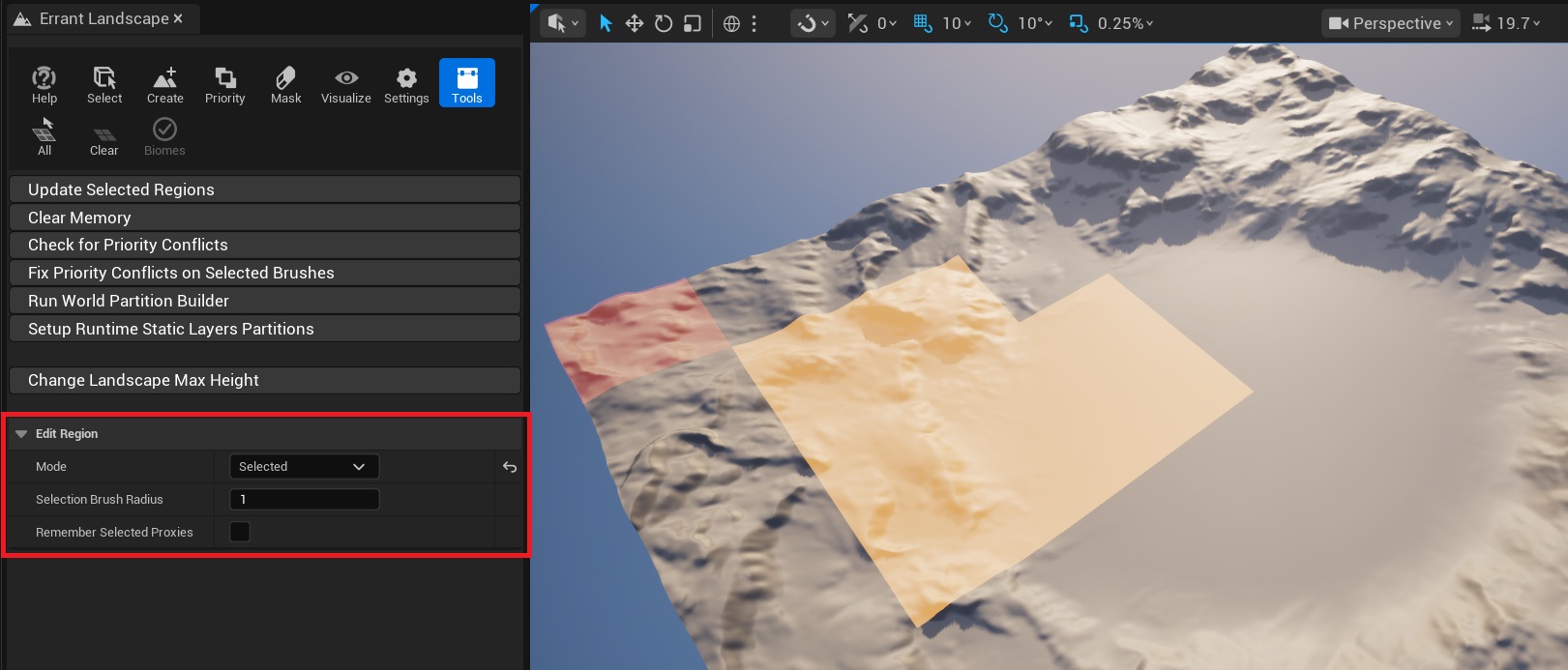
The Edit Region settings at the bottom of the Tools tab control whether the update affects the whole loaded landscape or only selected proxies.
Mode: Allmakes the button update all loaded landscape proxies.Mode: Selectedchanges the button label toUpdate Selected Regionsand updates only the selected loaded proxies.Selection Brush Radiuscontrols how many proxies are selected under the cursor at once. Use[and]to decrease or increase the radius.Remember Selected Proxiespersists the current proxy selection between editor restarts.
When Mode is set to Selected, use the landscape viewport to paint the update selection:
- Open Errant Landscape mode.
- Open the
Toolstab. - Set
Edit Region->ModetoSelected. - Drag with the left mouse button over the landscape proxies you want to update.
- Hold
Shiftwhile dragging to remove proxies from the selection. - Click
Update Selected Regions.
The All toolbar button selects all loaded proxies that belong to landscapes registered with Errant Landscape.
The Clear toolbar button clears the proxy selection.
If Mode is set to Selected and no proxies are selected, Errant Landscape asks whether you want to update the whole loaded landscape instead.